
Why Client Feedback Is Quietly Killing Your Margins
You know the pattern. You deliver a staging link. The client opens it on their laptop, finds something broken and sends you a WhatsApp message that says "the button looks weird." No browser info. No screenshot. No idea which page they were on.
You follow up. They reply two days later with a blurry photo of their monitor.
This isn't a people problem, it's a process problem. And for most agencies, it compounds across every project, every client, every review cycle. The time lost isn't in the big dramatic failures. It's in the back-and-forth. The clarification emails. The "can you describe exactly what you're seeing?" conversations that eat 20 minutes and still leave your developers guessing.
Client feedback loops are one of the biggest hidden costs in agency work. And most agencies are still running them on gut feeling and goodwill.
What Actually Goes Wrong During Website UAT
UAT (User Acceptance Testing) is the phase that should be clean and controlled. In reality, it's often where projects start to unravel.
Here's what typically goes wrong:
- Clients don't know what information developers need when reporting a bug
- Feedback arrives via email, Slack, phone calls and the occasional sticky note photo
- The same issue gets reported multiple times by different stakeholders
- No one knows the status of a reported bug without asking
- Developers spend time reproducing issues that were described vaguely instead of fixing them
The result: handoffs drag, go-lives slip and your team absorbs the cost.
The fix isn't a longer onboarding document explaining how clients should report bugs. The fix is making correct reporting the path of least resistance so clients can't accidentally give you useless feedback.
How Visual Feedback Tools Change the Equation
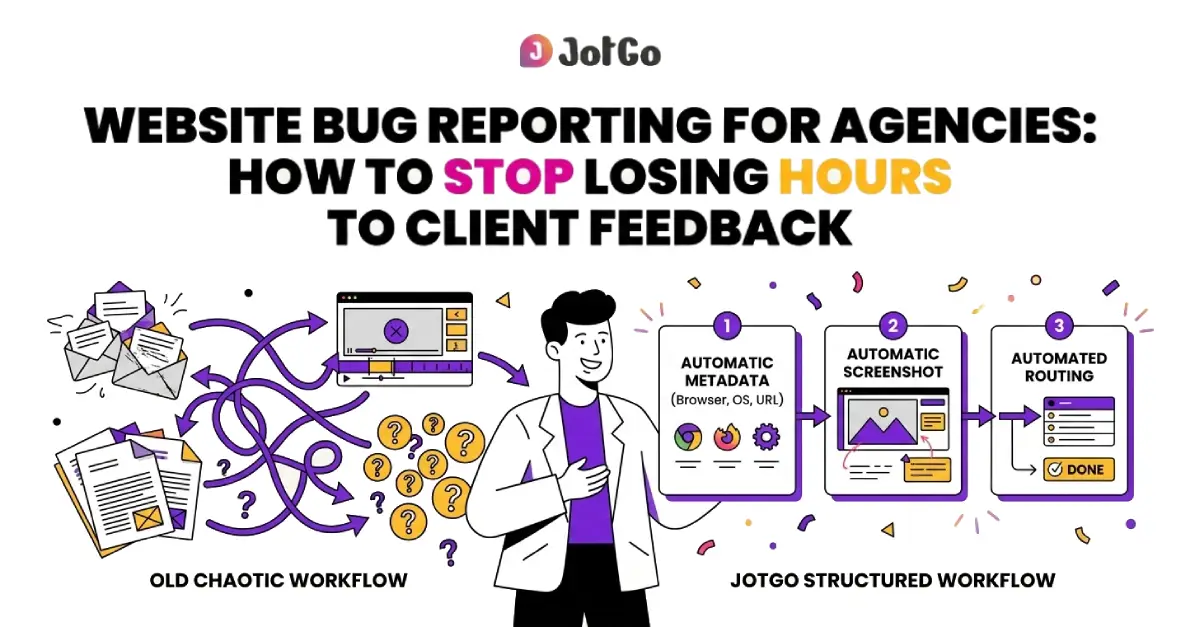
Visual feedback tools let clients click directly on the page element they're having an issue with and submit a report. The tool does the rest: captures a screenshot, logs the browser and OS, records the URL and packages it up as a structured ticket.
No training required. No instructions to ignore. No "can you send me your browser version?"
This is the shift that actually moves the needle. When feedback arrives structured and complete, developers spend their time fixing, not clarifying.
What to Look for in a Web Bug Tracking Tool for Agencies
Not all web bug tracking tools are built for agency workflows. Some are built for internal engineering teams and assume everyone submitting a ticket knows what a console log is. That's fine for a dev-only setup, not fine when your client is a marketing director at a mid-sized retailer.
Here's what actually matters for agency use:
The goal is a tool your team lives in and your clients can use once without help.
How JotGo Fits Into an Agency Workflow
JotGo was built with mixed teams in mind developers, QA, PMs and non-technical stakeholders all using the same tool without friction.
For agencies, that matters a lot. Your internal team needs depth: filtering, prioritisation, developer context, integrations. Your clients need simplicity: click, describe, submit.
JotGo handles both.
One-click bug capture means that when a client spots an issue, they click once and get a report pre-loaded with a screenshot, console logs and full browser and OS metadata automatically. They don't have to think about what information to include. It's already there.
From there, reports integrate directly with Jira, Linear, Zendesk etc. , so your developers see structured tickets in the tools they're already working in. No copy-pasting. No reformatting. No translation layer between what the client saw and what the developer reads.
The outcome: agencies using JotGo resolve bugs 47% faster on average. That's not a rounding error that's half your UAT cycle back.
JotGo runs entirely in the browser. Nothing to install on your end, nothing to install on the client's end. For agencies managing multiple clients across multiple projects, that matters.
How to Run Client Review Cycles Without the Chaos
Here's a practical setup that works across different project types whether you're delivering a new site build, a redesign, or an ongoing retainer:
1. Set up a JotGo project for each client engagement takes under two minutes and you can define the workflow to match your delivery process.
2. Share the feedback link with the client before the review session. JotGo requires no account creation for clients submitting reports, so there's zero barrier to entry.
3. Brief clients in one sentence "When you see something that needs changing, click the JotGo button and describe what you're seeing. We'll take it from there." That's the entire instruction set.
4. Triage incoming reports in JotGo label, prioritise and assign. Your team sees structured tickets with full context from the moment the report lands.
5. Push confirmed bugs to Jira, Linear, or Zendesk your developers work in their existing tools. Nothing changes for them except the quality of the tickets.
6. Close the loop, visibly update ticket status so clients can see what's been addressed, what's in progress and what's been deprioritised. Fewer status-check emails, more trust.
This structure works for a two-person agency and a 30-person one. It scales without adding overhead.
The Real Cost of Bad Bug Reporting
Let's be concrete. If your team spends an average of 15 minutes per bug request chasing clarification and a typical UAT phase generates 40 reports, that's 10 hours per project spent before anyone has actually fixed anything.
Multiply that by six projects a year. You've lost 60 hours to process friction.
With structured bug reporting, that clarification time drops close to zero. Reports arrive with everything needed to act. Developers reproduce issues in minutes, not days.
At agency billing rates, that's not a small number.
Frequently asked questions
The best bug reporting tool for agencies is one that non-technical clients can use without training and that gives developers the context they actually need. JotGo ticks both boxes, one-click capture picks up screenshots, console logs, browser metadata automatically and it integrates with Jira, Linear and Zendesk. No installs. No client accounts required. Built for mixed teams.
The most effective approach is a browser-based visual feedback tool embedded in the staging environment. Clients click to annotate issues directly on the page and structured reports with screenshots and technical metadata go straight into the agency's project management workflow. This replaces the email chains, Slack messages and vague descriptions that slow down most agency review cycles.
Yes, clients sign up or log in to JotGo before submitting bugs, but that's the only setup involved. The quick account step is what makes JotGo work for agencies: every report gets tied to the right client and project automatically, screenshots, browser data and console logs stay attached and nothing gets lost in email threads or Slack DMs. Sign-up takes under a minute and after that, clients can report issues in seconds giving your team clean, traceable feedback from day one instead of scattered, unstructured messages to chase down later.
Structure is everything during UAT. Use a dedicated bug tracking project for each client, route all feedback through a single tool (not email) and make sure every report includes enough context for a developer to reproduce the issue without follow-up questions. JotGo captures metadata automatically and integrates with your existing workflow tools, so UAT stays organised even when clients are submitting feedback from multiple stakeholders at once.
If your current process involves chasing clients for browser screenshots or untangling three Slack threads to understand one bug report, it's costing you more than you think.
JotGo is built for exactly these agencies that need a professional, structured feedback and bug tracking setup that works for technical and non-technical people alike. It's fast to set up, affordable, and your clients will actually use it.
Ready to cut triage time in half?
Capture every bug with screenshots, session replay, severity tracking, and rich debugging data - all free to get started.
Start Free