
Keep your team aligned, always.
Threaded comments, @mentions, role-based access and real-time updates - everything needed to close bugs faster.
Feature Walkthrough
Key capabilities of Team Collaboration
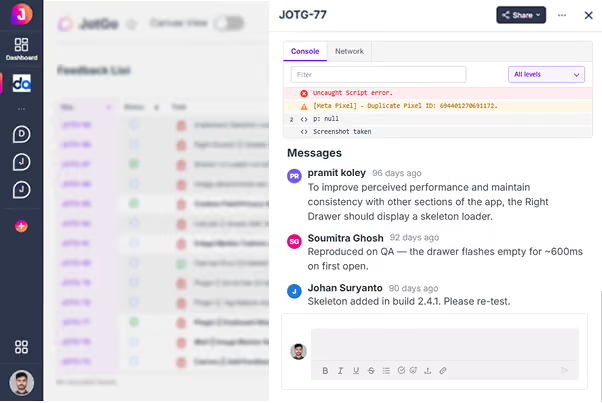
Comments & Replies
Discuss every bug in context, with each comment attached to the exact report and full metadata visible alongside it. The whole conversation lives with the issue instead of scattered across Slack and email. Anyone joining later sees the complete history at a glance.
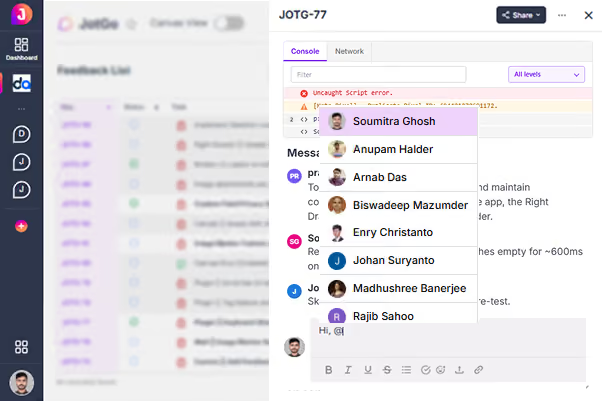
@Mentions & Alerts
Pull the right person into a bug instantly with an @mention, and they are notified in real time. Everyone else only sees the updates that actually matter to them. No more noisy channels or important messages buried under noise.
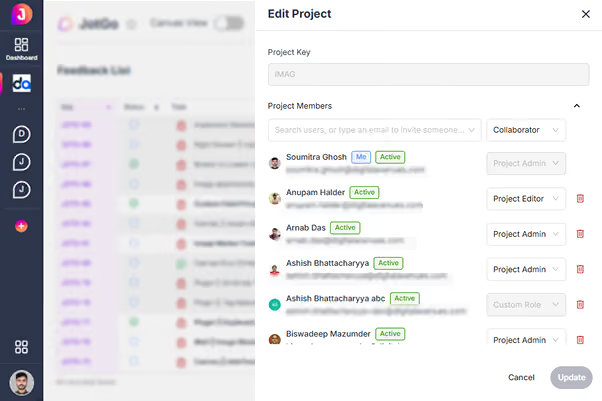
Collaborator Roles
Owner, Admin, Member and Viewer roles give you granular control over who can see and do what. The right people get the right level of access, nothing more. It keeps clients and contractors safely scoped while your core team moves fast.
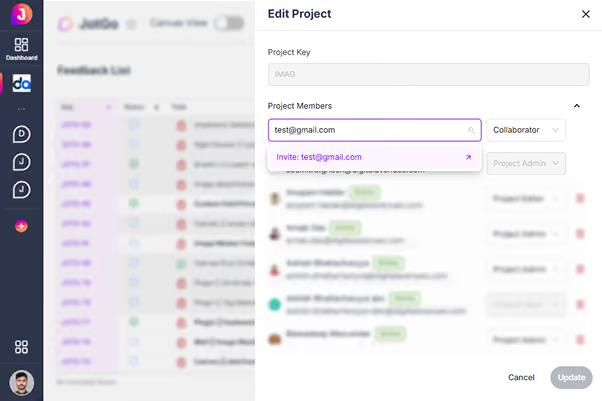
User Invitations
Invite teammates directly from a project in seconds, with permissions pre-configured before they even accept. New members are productive from their very first login. Onboarding a collaborator takes moments, not a support ticket.

Sharing & Stakeholder Engagement
Share bug reports with clients and stakeholders via public links with no login required. External viewers get the full context - screenshot, metadata and steps - and can leave comments directly. It keeps everyone aligned without adding seats or friction.
Ready to try Team Collaboration?
Join thousands of teams who resolve bugs faster with JotGo.