
Ship faster. Break less. Fix everything.
JotGo gives product teams a structured, AI-powered bug reporting workflow - from capture to closed ticket - without the noise.
From capture to shipped fix
JotGo turns raw reports into developer-ready tickets - no noise, no duplicates.
Capture in one click
Anyone on the team files a bug straight from the app.
Context auto-attached
Screenshot, browser console & steps captured for you.
Triage per client
Assign, prioritise & track in a workspace per client.
Push to your sprint
Send to Jira, Linear, Zendesk, Slack and Izio in one click, fully synced.
Ship & verify
Track status to done and confirm the fix with replay.
Product teams waste hours on broken bug reports.
Every bug that lands without context, in the wrong channel or with no clear status costs your team hours - and makes clients wait. Here’s where agencies lose the most time.
"It's broken" - with no context
Vague reports with no screenshot, no browser info, no steps to reproduce. Developers waste hours recreating bugs from scratch.
Every report auto-captures screenshot, console, browser & steps.
Rich bug reports take too long to create
Collecting screenshots, recordings, logs, and environment details from different tools wastes valuable time and often results in incomplete reports.
Capture everything from a single interface-including screenshots, videos, annotations, console logs, browser details and attachments.
Developer context gap
Product managers write tickets; developers need logs and stack traces. The gap between "what was reported" and "what I need to fix it" is too wide.
Session data, logs & stack traces attached automatically.
How JotGo helps product
teams ship faster
From capture to closed ticket - where JotGo removes the noise so your team can move.
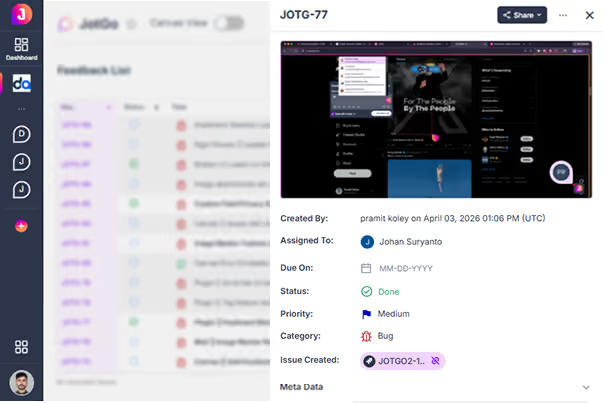
Capture complete bug reports in minutes
JotGo combines screenshots, screen recordings, annotations, console logs, browser information, environment details and attachments into a single report that developers can immediately understand.
Developers spend less time requesting additional information and more time fixing issues.
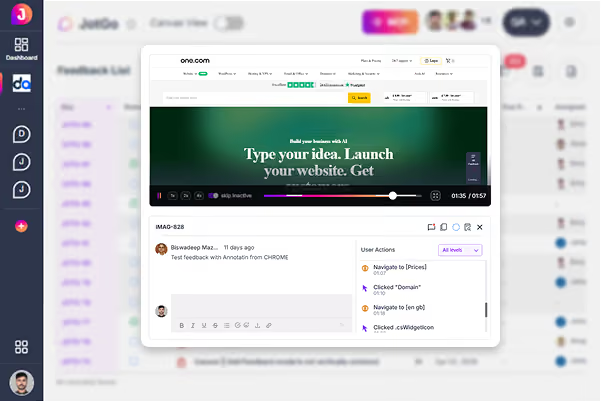
Watch exactly what the user did.
Session Replay gives developers a pixel-accurate recording of the user's journey - with console logs and network traces synced to the timeline. No more guesswork.
No more “can’t reproduce” - see the exact path to the bug.
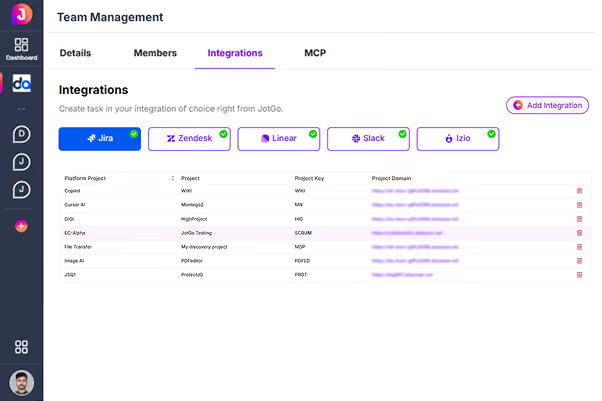
Connect JotGo with your development workflow
Keep product, QA, and engineering teams connected by sending issues directly to the tools they already use.
Less manual work, better collaboration, and faster issue resolution.
The results speak for
themselves.
Product teams using JotGo ship faster and with fewer regressions.
Questions, answered
JotGo captures browser details, operating system information, screen resolution, console logs, environment details, screenshots, recordings and other supporting context to help developers investigate issues faster.
Yes. You can capture screen recordings, annotate them, and include them with your feedback to clearly demonstrate the issue.
Yes. JotGo integrates with Jira, Zendesk, Linear, Slack and other popular project management and collaboration platforms.
Yes. Session Replay allows developers to review the user's journey alongside console logs and technical details, making issues easier to understand and reproduce.
JotGo is designed for Product Managers, QA Engineers, Designers, Developers, Customer Success teams and anyone involved in reporting, tracking or resolving product issues.
Ready to streamline client bug reporting?
Join thousands of teams who resolve bugs faster with JotGo.