
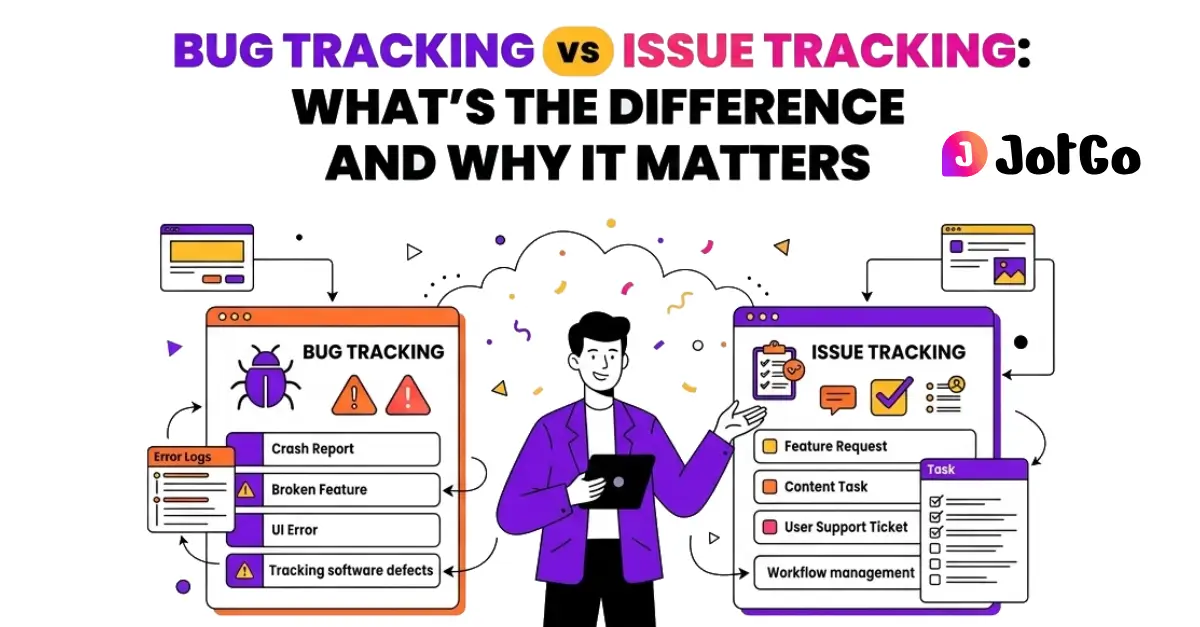
Are Bug Tracking and Issue Tracking the Same Thing?
No and conflating them causes real problems for teams.
A bug is a specific type of issue: a defect in software that causes it to behave differently from what was intended. A crash on checkout. A button that doesn't respond. A filter that returns the wrong results. Bugs are concrete, reproducible (usually) and tied directly to code.
An issue is a broader category. Issues can include:
- Software bugs
- Feature requests
- UX improvements
- Documentation gaps
- Performance complaints
- General support tickets
So all bugs are issues, but not all issues are bugs. That distinction matters more than most teams realise, especially when you're trying to prioritise a backlog or report progress to stakeholders.
Why Does the Distinction Matter in Practice?
When teams lump everything into a single undifferentiated queue, a few things tend to go wrong.
Bugs get buried. A critical login failure sits next to a feature request for dark mode. Engineers have to manually sort through the noise to find what actually needs fixing now.
Metrics become meaningless. If your "issue count" includes feature requests and bug reports in one pile, you can't get a clean picture of software quality. Is the number going up because you're adding features or because your app is getting buggier? You genuinely can't tell.
Triage breaks down. Bug triage requires specific information, reproduction steps, environment details, severity. Feature requests need different context entirely. Mixing them in the same workflow without categorisation creates friction for everyone involved.
Stakeholders get confused. A PM reporting to leadership on "open issues" looks very different depending on whether that number is 40 bugs or 30 feature requests and 10 bugs. The framing matters.
Getting this right isn't pedantic, it's how functional QA and product workflows actually operate.
What Does a Bug Tracker Do That a General Issue Tracker Doesn't?
A dedicated bug tracker (or a good bug and issue tracking tool) is designed around the specific needs of identifying, reproducing and resolving defects.
Here's what that means in practice:
The key difference is friction. When someone spots a bug and has to manually write up browser version, OS, steps to reproduce and attach a screenshot most of the time, they don't. Or they do it badly. Either way, the developer on the other end can't actually fix it without going back and asking for more information.
A proper bg tracker eliminates that back-and-forth by capturing the relevant context automatically at the moment of reporting.
That's exactly what JotGo does. One click captures a screenshot, console logs and full browser and OS metadata, no copy-pasting, no manual form-filling. The bug report is complete before it lands in anyone's inbox.
When Should You Use Bug Tracking vs Issue Tracking?
The honest answer: most teams need both, ideally in the same tool.
Use bug-specific workflows when:
- You're in active QA or UAT
- You're triaging defects before a release
- You're tracking regression issues across builds
- You need to report on software quality metrics
Use broader issue tracking when:
- You're managing feature requests alongside defects
- You're handling customer-reported problems that may or may not be bugs
- You're coordinating work across QA, PMs and non-technical stakeholders
The best issue tracking software doesn't force you to choose. It handles both without making the tool complicated for people who only need one or the other.
What's the Difference for Mixed Teams, QA, PMs and Developers?
This is where the debate gets practical.
A QA engineer wants structured defect reports with reproduction steps and environment data. A PM wants to see priority, status and how things map to release milestones. A developer wants a clean ticket with everything they need to reproduce and fix the issue nothing more, nothing less. A non-technical stakeholder just needs to know if the thing is fixed yet.
Most tools optimise for one of these groups and make the others work around it. That's why so many teams end up with parallel systems a bug tracker for QA, a project board for PMs, a support tool for customer-facing issues none of which talk to each other properly.
JotGo is built for mixed teams. It integrates directly with Jira, Linear, Slack and Zendesk etc. , so bugs reported in JotGo flow into whatever system each team already uses. QA captures the bug. It lands in Jira for the developer. The PM tracks it on their board. Nobody has to re-enter anything.
Internal data shows teams using JotGo resolve bugs 47% faster on average. Most of that gain comes from eliminating the back-and-forth on incomplete reports.
What Is the Best Issue Tracking Software?
There's no universal answer but there are useful criteria.
The right issue tracking software for your team should:
1. Make reporting fast and complete. If reporting a bug takes five minutes of manual effort, people skip steps. Automation matters.
2. Work for non-technical users.QA and developers aren't the only people who spot problems. The tool needs to be usable by anyone.
3. Integrate with your existing stack. A standalone tool that doesn't connect to your project management or support software creates more work, not less.
4. Give you clear metrics. You need to distinguish bugs from feature requests from tasks to get meaningful data on software quality.
5. Require no setup overhead. If the tool itself is a project, adoption will be poor.
JotGo runs entirely in the browser with nothing to install. It's genuinely usable by non-technical team members on day one. And the free trial requires no credit card, so you can evaluate it properly without any commitment.
The Bottom Line
Bug tracking and issue tracking serve different purposes, but the best teams don't separate them; they manage both in a single, well-structured system. The goal is simple: when something's broken, it gets reported completely, routed correctly and fixed fast. That doesn't happen when your tools create friction, force manual data entry, or leave non-technical team members out of the loop.
JotGo handles both sides of this without the overhead. One-click capture. Browser-based. Integrated with the tools your team already uses. No installation, no credit card required to try it.
Frequently asked questions
No. Bug tracking is a subset of issue tracking. A bug is a software defect, something that's broken. An issue is any actionable item: a bug, feature request, task, or question. Good bug and issue tracking tools handle both but keep them categorised so your metrics and workflows stay meaningful. JotGo supports both bug-specific reporting and broader issue management in one place.
It depends on your team's primary need but most teams benefit from a tool that handles both without bloat. Dedicated bug trackers capture richer technical context (console logs, metadata, screenshots) that general issue trackers miss. JotGo bridges the gap: it captures developer-grade bug detail automatically and integrates with Jira, Linear, Slack and Zendesk so the rest of your issue workflow stays intact.
The best issue tracking software is the one your whole team will actually use. That means fast reporting, no installation barrier and integrations with the tools you already have. For mixed teams QA, PMs, developers and non-technical stakeholders JotGo consistently outperforms single-audience tools. One-click bug capture, browser-based access, and seamless integrations mean less friction and faster resolution. Internal data puts average resolution time improvement at 47%.
Most teams don't. Using separate tools creates duplication, broken handoffs, and reporting gaps. The smarter approach is a single bug issue tracker that supports structured defect reporting alongside general issue management. JotGo is designed for exactly this, giving QA engineers the technical detail they need while keeping things accessible for PMs and stakeholders who just need status visibility.
They should be able to but many can't, because most bug trackers assume technical fluency. JotGo fixes this. One click captures everything a developer needs (screenshot, console logs, browser and OS metadata) without the reporter having to know what any of it means. A product manager or customer success rep can file a complete, actionable bug report as easily as a QA engineer.
Ready to cut triage time in half?
Capture every bug with screenshots, session replay, severity tracking, and rich debugging data - all free to get started.
Start Free